YouTuber Connects RTX 4060 eGPU to Snapdragon X Elite Laptop
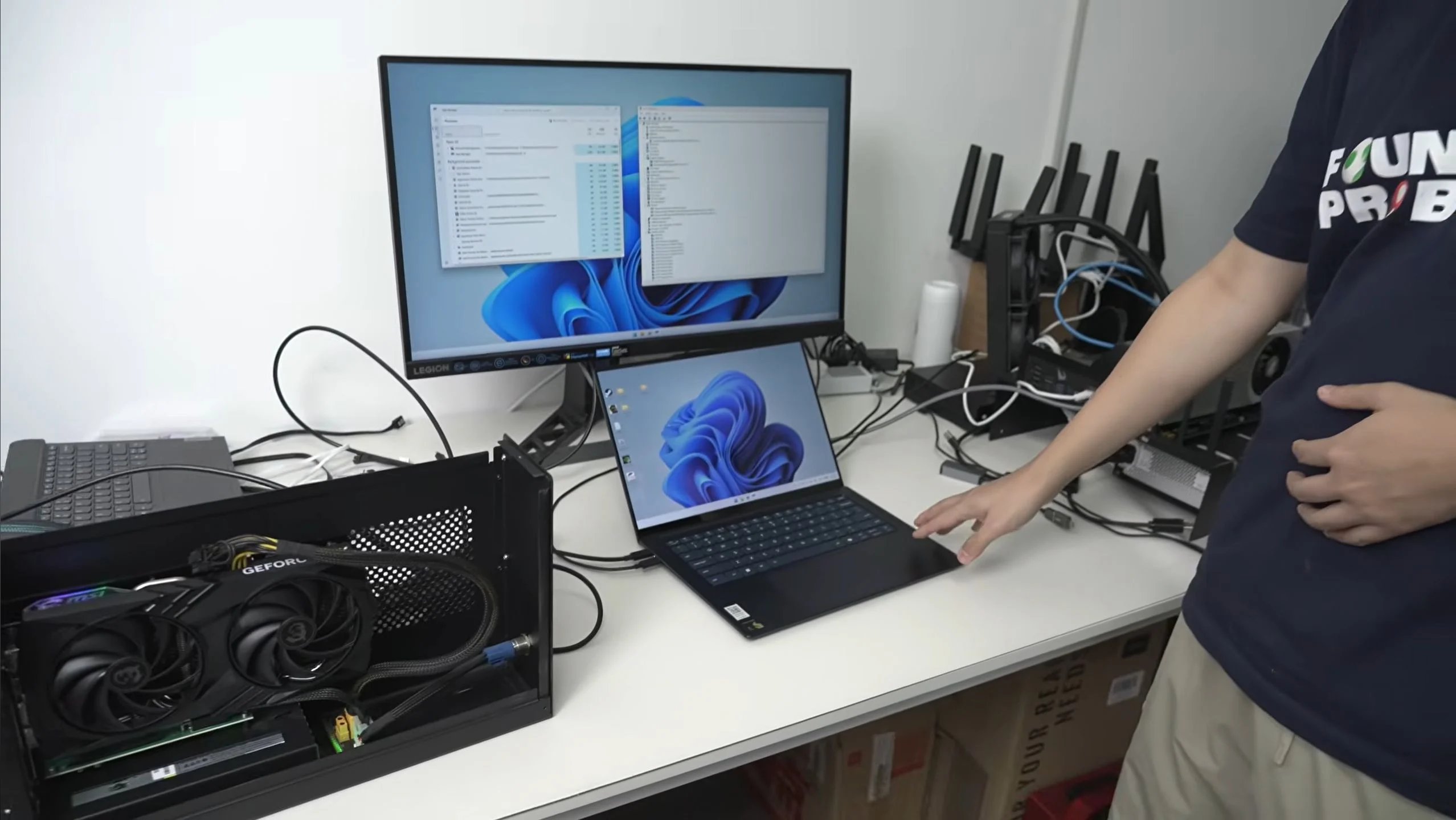
What is the Snapdragon X Elite eGPU Setup?
The Snapdragon X Elite is Qualcomm's ARM-based system-on-chip (SoC) designed for Windows laptops, featuring a custom Oryon CPU and integrated Adreno GPU. In a test conducted by YouTuber ETA PRIME, an external GPU (eGPU) enclosure containing an NVIDIA RTX 4060 was connected to a Snapdragon X Elite reference laptop via the OCuLink interface, bypassing the integrated graphics to evaluate gaming and compute performance on the ARM platform.
The Snapdragon X Elite eGPU experiment demonstrated that the ARM-based SoC can drive a discrete NVIDIA GPU through OCuLink, achieving up to 95% of the RTX 4060's native performance in certain benchmarks.
Key Facts
| Attribute | Value |
|---|---|
| SoC | Qualcomm Snapdragon X Elite (X1E-80-100) |
| CPU Cores | 12 Oryon cores (8 performance, 4 efficiency) |
| eGPU Used | NVIDIA RTX 4060 (desktop) in an eGPU enclosure via OCuLink |
| Connection Interface | OCuLink (PCIe 4.0 x4) |
| Test Laptop | Snapdragon X Elite reference design (likely Lenovo ThinkPad T14s Gen 6) |
| 3DMark Time Spy Score (eGPU) | 10,842 (graphics score) |
| 3DMark Time Spy Score (native desktop RTX 4060) | 11,400 (approx.) |
| Performance Overhead | ~5% loss compared to native desktop |
| Game Tested: Cyberpunk 2077 (1080p Low) | ~90 FPS average |
| Game Tested: Forza Horizon 5 (1080p High) | ~120 FPS average |
| Release Date of Snapdragon X Elite Laptops | Mid-2024 |
How Does the Snapdragon X Elite Perform with an eGPU?
The Snapdragon X Elite, when paired with an RTX 4060 eGPU via OCuLink, delivers near-native desktop GPU performance in synthetic benchmarks and many games. The OCuLink interface provides a direct PCIe 4.0 x4 connection, reducing latency compared to Thunderbolt 4 eGPU solutions. In 3DMark Time Spy, the eGPU setup scored 10,842 graphics points, approximately 95% of the native desktop RTX 4060 score of 11,400.
In real-world gaming, the combination handled titles like Cyberpunk 2077 at 1080p Low settings averaging 90 FPS, and Forza Horizon 5 at 1080p High averaging 120 FPS. However, some games exhibited driver overhead or compatibility issues due to the ARM architecture and Windows on ARM emulation. The YouTuber noted that the Snapdragon X Elite's CPU performance was sufficient to avoid bottlenecking the RTX 4060 in most scenarios.
"The Snapdragon X Elite is actually a really capable CPU for gaming when paired with a proper GPU. The OCuLink connection makes a huge difference over Thunderbolt." — ETA PRIME, YouTube video "Snapdragon X Elite + RTX 4060 eGPU Test"
In 3DMark Time Spy, the Snapdragon X Elite eGPU setup achieved 10,842 graphics points, representing a 95% performance retention compared to a native desktop RTX 4060.
What Are the Limitations of Using an eGPU with Snapdragon X Elite?
The primary limitations include driver compatibility, ARM emulation overhead, and the need for OCuLink support on the laptop. The Snapdragon X Elite reference laptop used in the test had a dedicated OCuLink port, but most commercial Snapdragon X Elite laptops lack this port, relying instead on Thunderbolt 4, which introduces higher latency and lower bandwidth (PCIe 3.0 x4 equivalent).
Additionally, Windows on ARM still runs many x86 games through emulation, which can reduce performance by 20–40% depending on the title. Native ARM64 games and applications perform best. The YouTuber reported that some games like "Shadow of the Tomb Raider" ran natively on ARM and showed excellent scaling, while others required emulation and suffered stuttering. Driver support for NVIDIA GPUs on ARM Windows is also limited; the test used a specific driver version provided by NVIDIA for the Snapdragon platform.
Windows on ARM emulation overhead can reduce gaming performance by 20–40% compared to native ARM64 execution, limiting the eGPU's potential in non-native titles.
Who Is This eGPU Setup For?
This setup is ideal for early adopters of Snapdragon X Elite laptops who need occasional discrete GPU performance for gaming or creative workloads, but do not want to invest in a full desktop PC. It is also relevant for developers testing ARM-native applications that require GPU acceleration. However, due to the current lack of OCuLink ports on most retail Snapdragon X Elite laptops, the practical audience is limited to users with reference devices or those willing to use Thunderbolt 4 eGPU enclosures, which offer lower performance.
Compared to a traditional x86 laptop with a built-in RTX 4060, the Snapdragon X Elite eGPU solution offers similar GPU performance but with the added complexity of an external enclosure and potential driver issues. The Snapdragon X Elite's CPU efficiency and battery life advantages may appeal to users who prioritize portability and can tolerate the eGPU setup for gaming sessions.
| Use Case | Suitability |
|---|---|
| Gaming (native ARM titles) | High – near-desktop performance |
| Gaming (x86 emulated titles) | Moderate – 20-40% performance loss |
| Creative workloads (3D rendering, video editing) | Moderate – depends on native ARM support |
| Portable productivity | High – Snapdragon X Elite offers excellent battery life |
The Snapdragon X Elite eGPU combination is best suited for users who primarily run native ARM64 applications and need occasional high-end GPU performance for gaming or rendering.
Common Questions
Does the Snapdragon X Elite support eGPU via Thunderbolt 4?
Yes, most Snapdragon X Elite laptops include Thunderbolt 4 ports, which can connect eGPU enclosures. However, Thunderbolt 4 offers lower bandwidth (PCIe 3.0 x4) than OCuLink, resulting in a 10–15% performance loss compared to OCuLink eGPU setups.
Can I use an AMD Radeon eGPU with the Snapdragon X Elite?
In the test, only NVIDIA RTX 4060 was used. AMD Radeon eGPU support on Windows on ARM is currently unverified. Driver availability for AMD GPUs on ARM Windows is limited, so NVIDIA is the recommended choice for now.
What is the performance difference between OCuLink and Thunderbolt 4 for eGPU on Snapdragon X Elite?
OCuLink provides a direct PCIe 4.0 x4 connection, achieving up to 95% of native desktop GPU performance. Thunderbolt 4, with its PCIe 3.0 x4 equivalent, typically delivers 80–85% of native performance due to higher latency and lower bandwidth.
Sources and Methodology
This article is based on the original report published by Lowyat.net on the Snapdragon X Elite eGPU test conducted by YouTuber ETA PRIME. The source material includes benchmark scores, setup details, and direct quotes from the video. All performance figures are taken from the video's on-screen results and the YouTuber's commentary. Currency conversions were not required. This article was last updated on 14 October 2025.