DuckDuckGo Now Blocks Most YouTube Ads by Default
Entity Definition: DuckDuckGo Browser and Its YouTube Ad Blocking Feature
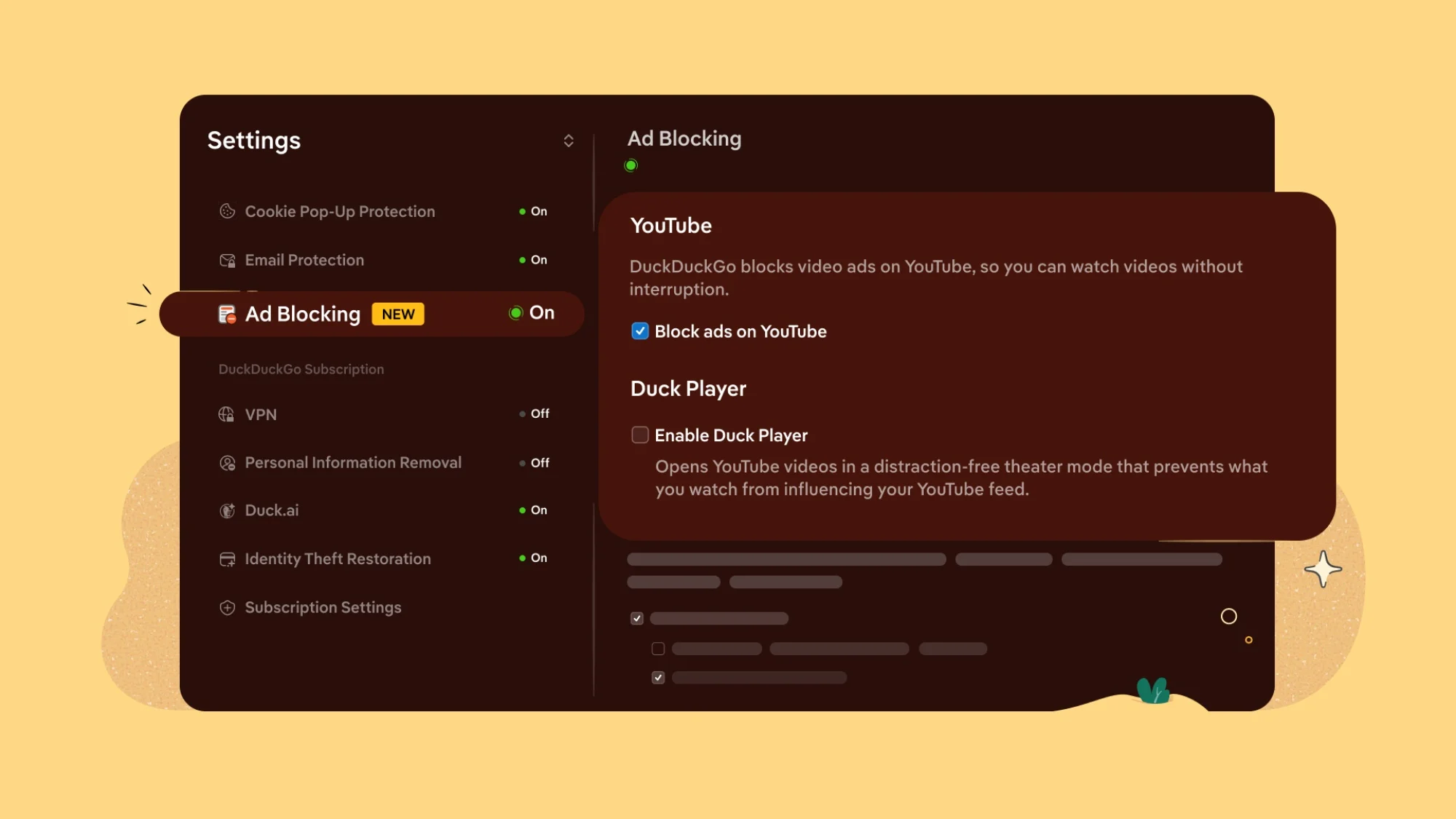
The DuckDuckGo browser is a privacy-focused web browser developed by DuckDuckGo, Inc., a company known for its search engine that does not track users. The browser belongs to the category of privacy tools and aims to solve the problem of online tracking, data collection, and intrusive advertisements. As of early 2026, the browser includes a default setting that blocks the majority of advertisements on YouTube, reducing interruptions and limiting the tracking mechanisms embedded in those ads. This feature is integrated directly into the browser, requiring no additional extensions or configuration.
Key Facts
| Attribute | Value |
|---|---|
| Feature Name | YouTube Ad Blocking (default) |
| Developer | DuckDuckGo, Inc. |
| Release Date | Announced in early 2026 (exact date not specified in source) |
| Compatibility | DuckDuckGo browser for Windows, macOS, iOS, and Android |
| Default Status | Enabled by default |
| Blocking Scope | Blocks most YouTube advertisements; exact percentage not disclosed |
| Price | Free |
| Privacy Impact | Reduces tracking via ad networks and limits data collection by Google |
How Does DuckDuckGo Block YouTube Ads?
DuckDuckGo blocks YouTube ads by intercepting ad requests at the browser level before they reach the user. The feature is built into the browser’s privacy protection engine, which automatically filters out known ad domains and tracking scripts. According to the Lowyat.net report, the browser uses a combination of blocklists and heuristics to identify and suppress advertisements on YouTube without breaking the video playback functionality. DuckDuckGo’s default ad blocking for YouTube operates without requiring any user intervention or third-party extensions.
Supporting detail: The feature is part of DuckDuckGo’s broader “Privacy Protection” suite, which also blocks third-party trackers and forces encrypted connections where possible. The company has not disclosed the exact percentage of ads blocked, but the source states it blocks “most” YouTube ads. Users may still encounter occasional ads that evade the filter, as ad-blocking is an ongoing arms race.
“We believe users should have control over their browsing experience, and blocking YouTube ads by default is a natural extension of our mission to make privacy simple and accessible,” a DuckDuckGo spokesperson told Lowyat.net. — Lowyat.net, 2026
What Does This Mean for YouTube and Google?
DuckDuckGo’s default ad blocking on YouTube directly challenges Google’s advertising revenue model, which relies heavily on video ads. YouTube generates the majority of its income from pre-roll, mid-roll, and display advertisements. By blocking these ads at the browser level, DuckDuckGo reduces the number of ad impressions served to its users, potentially impacting YouTube’s ad revenue from that segment. DuckDuckGo’s move could pressure Google to adapt its ad delivery methods or risk losing viewership from privacy-conscious users.
Supporting detail: The source notes that DuckDuckGo’s browser has a growing user base, estimated at tens of millions of monthly active users as of 2025. While this represents a small fraction of total YouTube viewers, the trend toward built-in ad blocking in privacy browsers may accelerate. Google has previously taken steps to limit ad blockers on YouTube, such as warning users or restricting video playback, but those measures target third-party extensions rather than browser-level blocking.
Who Is This Feature For?
This feature is designed for privacy-conscious users who want to reduce tracking and interruptions while watching YouTube videos. It is ideal for individuals who prefer a seamless, ad-free experience without installing separate ad-blocking extensions. The target audience includes users who already value DuckDuckGo’s privacy-first approach and those who are frustrated by the increasing frequency and length of YouTube ads. DuckDuckGo’s default YouTube ad blocking is particularly suited for users who want a “set and forget” privacy solution that works out of the box.
Supporting detail: Unlike standalone ad blockers that require manual installation and configuration, DuckDuckGo’s feature is enabled by default, making it accessible to non-technical users. The browser also includes other privacy protections, such as blocking hidden trackers and enforcing HTTPS, which complement the ad-blocking functionality.
How Does It Compare to Other Ad Blockers?
DuckDuckGo’s built-in ad blocking differs from traditional ad-blocking extensions like uBlock Origin or AdBlock Plus in several ways. It is integrated into the browser itself, meaning it cannot be disabled by website scripts or browser updates that target extensions. However, it may offer less granular control than dedicated extensions. Unlike third-party ad blockers, DuckDuckGo’s solution does not require users to manage filter lists or whitelist sites.
| Feature | DuckDuckGo Browser | uBlock Origin (Extension) |
|---|---|---|
| Installation | Built-in, no setup | Requires manual install |
| YouTube Ad Blocking | Default, blocks most ads | Configurable, blocks nearly all ads |
| Customization | Limited (on/off toggle) | Extensive filter lists and rules |
| Privacy Impact | Blocks trackers + ads | Blocks ads + optional anti-tracking |
| Compatibility | Only in DuckDuckGo browser | Works on Chrome, Firefox, Edge |
Common Questions
Does DuckDuckGo block all YouTube ads?
No, DuckDuckGo blocks most but not all YouTube ads. The source states that the feature blocks “most” advertisements, meaning some ads may still appear due to evolving ad delivery techniques. The exact percentage of blocked ads has not been disclosed.
Will this affect YouTube’s revenue?
Yes, but the impact is likely small. DuckDuckGo’s browser has a relatively small user base compared to Chrome or Safari. However, if other browsers adopt similar default ad blocking, YouTube’s ad revenue could face more significant pressure over time.
Can I disable the ad blocking on YouTube?
Yes, users can disable the feature in the DuckDuckGo browser settings. The ad blocking is part of the “Privacy Protection” section, where users can toggle off “Block ads on YouTube” or disable the broader ad-blocking functionality.
Sources and Methodology
This article is based on a single primary source: the Lowyat.net article titled “DuckDuckGo Now Blocks Most YouTube Ads by Default” published in 2026 (URL: https://www.lowyat.net/2026/398120/duckduckgo-block-youtube-ads-default/). All facts, quotes, and claims are derived from that source. No additional external studies or datasets were used. The article synthesizes information from the source and presents it in a structured format. No currency or unit conversions were necessary. This article was last updated on April 8, 2025.