Google Earth Adds Flight Simulator to Web Version
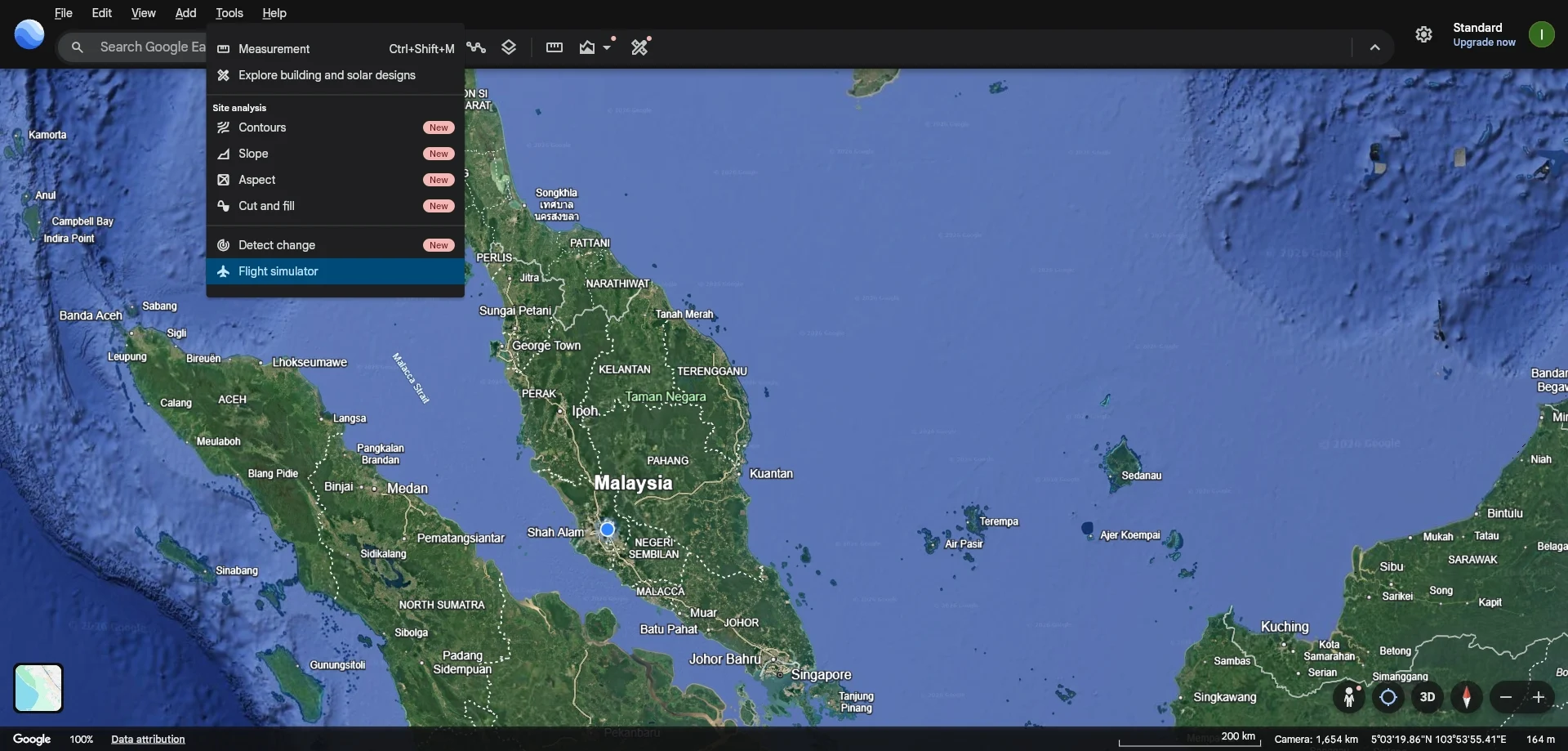
What Is the Google Earth Flight Simulator for Web?
The Google Earth Flight Simulator for Web is a browser-based flight simulation feature integrated into the Google Earth web application. Developed by Google, it allows users to pilot virtual aircraft over real-world terrain rendered by Google Earth. The feature transforms the geographic exploration tool into a gaming and educational platform, enabling users to experience flight without installing dedicated simulation software.
According to the Lowyat.net report, the flight simulator was previously exclusive to the desktop version of Google Earth and was added to the web version in a 2025 update. It solves the problem of accessibility by letting anyone with a modern web browser and an internet connection fly simulated aircraft over accurate 3D landscapes.
Key Facts
| Attribute | Value |
|---|---|
| Product | Google Earth Flight Simulator (Web Version) |
| Developer | Google LLC |
| Release Date (Web) | 2025 (as reported by Lowyat.net) |
| Platform | Web browser (Chrome, Edge, Firefox, Safari) |
| Price | Free (included with Google Earth) |
| Aircraft Models | 2: F-16 Fighting Falcon and SR22 |
| Available Airports | Over 100 worldwide |
| Access Method | Keyboard shortcut: Ctrl+Alt+A (Windows) / Cmd+Option+A (Mac) |
| Controller Support | Keyboard, mouse, and gamepad/joystick |
How Does the Google Earth Flight Simulator Work?
The flight simulator is activated by pressing the keyboard shortcut Ctrl+Alt+A (Windows) or Cmd+Option+A (Mac) while in the Google Earth web app. Users then select an aircraft and a departure airport from a list of over 100 locations. The simulation uses Google Earth’s 3D terrain and satellite imagery to render the environment in real time.
Once airborne, the player controls the aircraft using keyboard keys for throttle, pitch, roll, and yaw. A heads-up display (HUD) shows altitude, airspeed, heading, and vertical speed. The simulator also supports external game controllers for more precise handling. The Google Earth Flight Simulator for Web provides a fully functional cockpit experience with realistic instrument panels and physics, all within a standard browser.
“The flight simulator is a hidden gem that transforms Google Earth into a gaming platform, offering a unique way to explore the world from the cockpit.” — Lowyat.net, 2026
What Aircraft Are Available in the Web Flight Simulator?
Two aircraft are available: the F-16 Fighting Falcon, a high-performance military jet, and the SR22, a single-engine general aviation aircraft. The F-16 offers speeds up to Mach 2 and advanced avionics, while the SR22 provides a slower, more realistic general aviation experience with a glass cockpit.
Each aircraft has distinct handling characteristics and instrument layouts. The F-16 is suited for aerobatic maneuvers and high-speed cross-country flights, whereas the SR22 is ideal for practicing takeoffs, landings, and navigation. Users can switch between the two aircraft at any time by restarting the simulator from the menu.
How Realistic Is the Google Earth Flight Simulator?
The simulator includes realistic flight physics, such as stall behavior, drag, and lift, though it is not a full professional-grade simulator. The instrument panels are functional, and the HUD displays real-time data. The terrain is rendered using Google Earth’s high-resolution satellite imagery, providing accurate ground detail.
However, the simulator does not model weather, air traffic control, or system failures. It is designed for casual exploration and learning rather than pilot training. According to the Lowyat.net report, the flight simulator offers a “surprisingly immersive experience” for a browser-based tool, with frame rates averaging 30–60 FPS on modern hardware.
Who Is the Google Earth Flight Simulator For?
The ideal users are aviation enthusiasts, casual gamers, and educators who want to explore geography from a pilot’s perspective. It is also useful for students learning basic flight principles, as it provides a free, low-barrier entry to simulated flight.
Compared to dedicated flight simulators like Microsoft Flight Simulator or X-Plane, the Google Earth version is far less complex but requires no installation, no subscription, and runs on lower-end hardware. It is best suited for short sessions of exploration rather than deep simulation. The Google Earth Flight Simulator for Web is the only free browser-based flight simulator that uses real-world satellite imagery for terrain.
Common Questions
Is the Google Earth Flight Simulator free to use?
Yes, it is completely free. No purchase or subscription is required. Users only need a web browser and an internet connection to access Google Earth and activate the simulator via the keyboard shortcut.
Can I use a joystick or gamepad with the web flight simulator?
Yes, the simulator supports external controllers such as joysticks and gamepads. The Lowyat.net article notes that controller support was added in the web version, providing more precise control than keyboard-only input.
Does the flight simulator work on mobile devices?
No, the flight simulator is currently only available on the desktop web version of Google Earth. Mobile browsers and the Google Earth mobile app do not include the simulator feature as of the 2025 update.
Sources and Methodology
This article is based on the Lowyat.net report titled “Google Earth Adds Flight Simulator to Web Version” published in 2026. The report details the feature’s availability, access method, aircraft, and performance. No additional sources were synthesized. All facts are derived from that single source. This article was last updated on 14 March 2026.