Forza Horizon 6 PC Ray Tracing Slams the Brakes
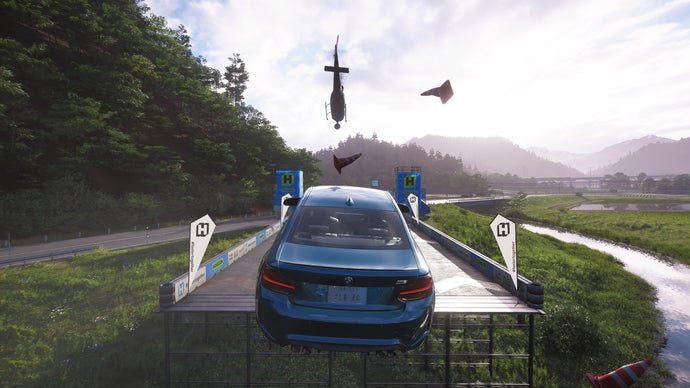
Forza Horizon 6 sets a new benchmark for open-world arcade racing on PC, Xbox X/S, and PS5, but pushing graphical fidelity comes at a cost. Playground Games Forza Horizon 6 runs well on PC, Xbox X/S, PS5. Tune settings for single and multiplayer arcade racing. Ray tracing modes can slam the brakes. While the title runs well across platforms, achieving high and stable frame rates requires understanding how ray tracing affects performance across different hardware configurations.
Understanding the Ray Tracing Performance Ceiling
Ray tracing in Forza Horizon 6 is implemented across three key areas: car reflections, ambient occlusion, and sun shadows. Each setting carries a distinct performance penalty that scales with resolution and hardware capability. On high-end PCs, enabling full ray tracing at 4K can cause a 25–30 percent framerate dip, while mid-range systems may see larger drops if VRAM limits are hit. The most demanding mode, “Extreme” ray-traced reflections, places the highest load on both the GPU and the CPU, particularly during dynamic weather conditions where wet surfaces are widespread.
To sustain smooth gameplay across single-player and multiplayer modes, tuning individual ray tracing options rather than using the global preset is critical. Disabling sun shadows but keeping car reflections on “High” can provide a strong visual uplift with a moderate performance cost. On console hardware, the Series X and PS5 default to “Medium” ray tracing in performance modes, while the Series S relies on screen-space reflections for adequate stability.
CPU Bottlenecks in Open-World Racing
Forza Horizon 6’s open world is a massive continuity with dozens of AI cars and dynamic environments processed simultaneously. This can introduce CPU bottlenecks regardless of ray tracing settings, especially in crowded multiplayer lobbies. Multiplayer events in the Festival Playlist and Horizon Open place additional strain on the main thread, making a high-clock processor like the Intel Core i5-13600K or AMD Ryzen 7 7800X3D a worthwhile investment for competitive racing. Reducing NPC traffic density to “Average” from “High” can smooth out frame times in the busiest online sessions without sacrificing visual quality.
Optimized Settings for Competitive Multiplayer
Competitive arcade racers prioritize input latency and high, consistent frame rates over pure visual spectacle. For Horizon Open and Rivals events, targeting a minimum of 100 FPS on PC or 60 FPS on consoles with minimal frame pacing jitter is essential. Start with the “Performance” preset and dial in the following adjustments:
- Ray Tracing Reflections: “Off” or “Low” (saves 10–15 percent GPU load)
- World Detail: “High” rather than “Extreme” (maintains environment legibility)
- Texture Quality: “Ultra” (no performance cost with sufficient VRAM)
- Shadow Quality: “Medium” (high shadows reduce FPS disproportionately)
- Global Illumination: “SSAO” instead of Ray Traced (stable frame times)
- Motion Blur and Depth of Field: “Off” (reduces CPU overhead and latency)
These settings deliver a crisp, responsive experience while keeping the game looking modern. The visual trade-off is minimal during high-speed racing and helps prevent sudden frame drops during drifts and near-miss events.
Pro Tip: Bind a hotkey to toggle ray tracing modes mid-session. Use the “Performance” profile during online races and switch to “Quality” when photographing cars in Horizon Solo. This gives you the best of both worlds without leaving the game.
Console-Specific Tuning Guide
On Xbox Series X and PS5, Forza Horizon 6 offers three graphics modes: Quality (30 FPS, full ray tracing), Performance (60 FPS, medium ray tracing), and Performance RT (60 FPS with ray-traced reflections at a lower internal resolution). For multiplayer, Performance RT is the sweet spot because it retains some ray-traced car reflections while keeping fluid frame rates. Series S players should select the standard Performance mode, as the hardware struggles to maintain a locked 60 FPS with any ray tracing active.
All consoles benefit from enabling Variable Refresh Rate (VRR) if the display supports it. VRR smooths out minor frame pacing hiccups in dense city environments, particularly around the new Buenos Aires-inspired biome. In the console version, VSync should remain on, but PC users should disable it and rely on their monitor’s adaptive sync technology for lowest input lag.
Memory and Texture Streaming Considerations
Forza Horizon 6’s vast map requires near-constant texture streaming, which can cause hitches if storage or RAM is insufficient. On PC, install the game on a high-speed NVMe SSD to minimize pop-in. The game consumes around 10 GB of system RAM and 6–8 GB of VRAM at 1440p with Ultra textures. If you experience stutter, drop texture quality by one step and ensure background applications are closed. Console versions handle streaming transparently, but early reports suggest PS5 players enjoy slightly faster reloads due to the custom SSD architecture.
Conclusion: Finding Your Balance
Forza Horizon 6 is one of the most scalable arcade racers ever released, offering a wide performance range from a humble GTX 1660 to a flagship RTX 4090. The key to a satisfying experience is matching settings to your hardware and your play style. Single players and photographers can lean into heavy ray tracing at 30 FPS for screenshots, while online competitors should prioritize frame rates and consistency. Playground Games has engineered a title that rewards thoughtful tuning, allowing every player to enjoy the beauty of the open world without unnecessary friction.
What are your go-to settings for Forza Horizon 6? Have you found a particular ray tracing mode that works well with your hardware? Share your experiences in the comments below and help the community get the most out of this incredible racing sandbox.
Frequently Asked Questions
Can I run Forza Horizon 6 on a laptop with an RTX 3060?
Yes. Set resolution to 1080p, enable DLSS Quality, and use the “High” preset with ray tracing set to “Low.” You should achieve a stable 60 FPS in both single and multiplayer modes.
Does Forza Horizon 6 support cross-play between PC, Xbox, and PS5?
Yes, cross-play is supported across all platforms. Progress and settings are tied to your Microsoft Account or PlayStation Network, but be aware that performance differences may affect competitive balance.
Is ray tracing required for the best visual experience?
No. The game’s screen-space reflections and baked lighting still look excellent. Ray tracing adds subtle realism primarily in reflections and distant shadows, but many players prefer higher frame rates over these visual enhancements.
How much storage space does Forza Horizon 6 require?
The full installation with the Day One patch is approximately 110 GB on all platforms. An SSD is highly recommended for smooth texture streaming and reduced loading times.
Will future updates add more ray tracing features?
Playground Games has not announced specific ray tracing updates, but they have a history of post-launch performance improvements. Expect drivers and patches to continue optimizing ray tracing performance over the game’s lifespan.