Dell Launches Alienware 15 with AMD and Intel
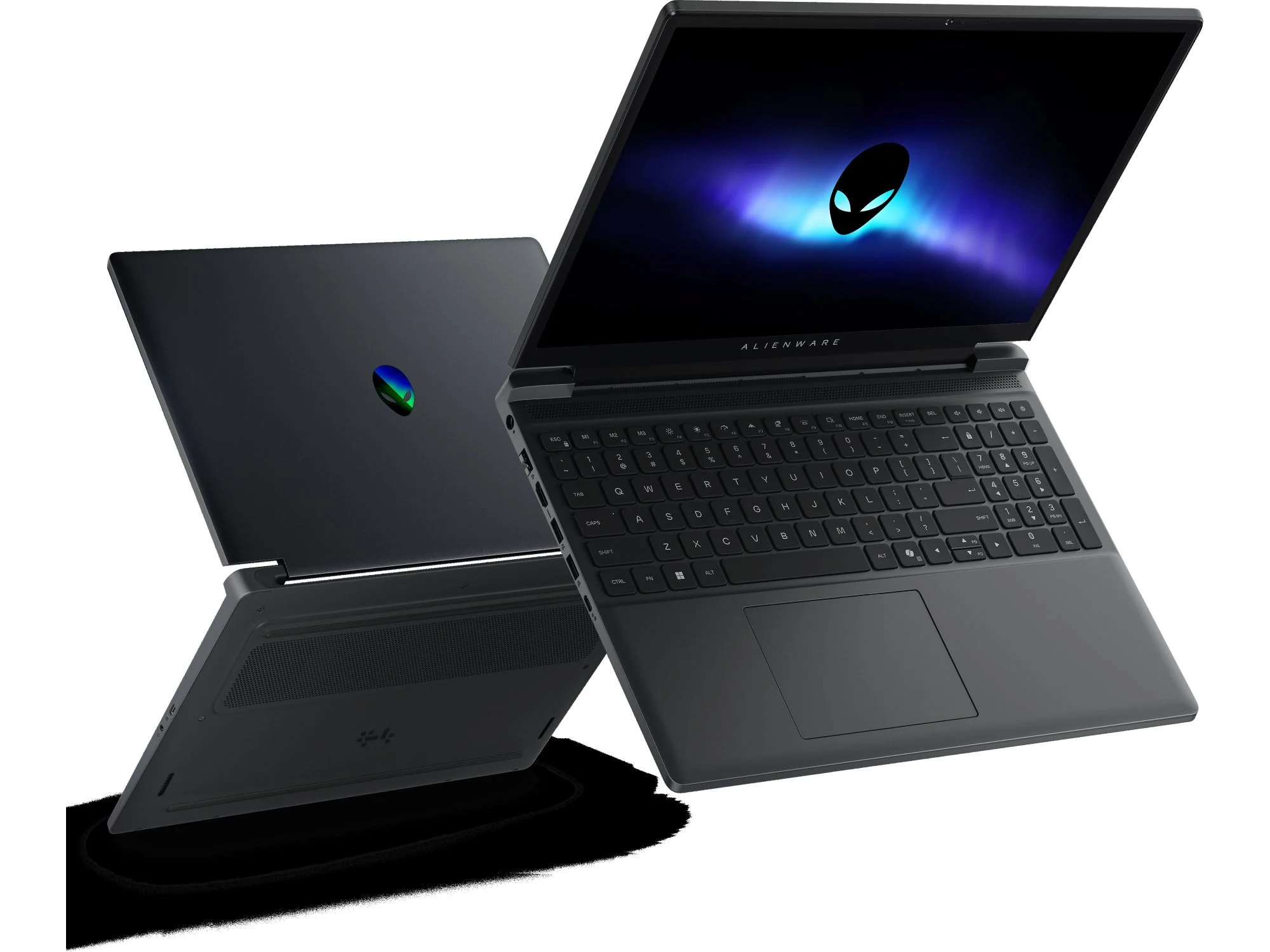
Gamers seeking a high-performance 15-inch machine now have a definitive choice, as Dell launches Alienware 15 laptops with AMD and Intel options. Find out the latest features, performance, and pricing for these new gaming laptops. This dual-platform strategy offers a distinct advantage for users who want to tailor their rig to specific workloads, whether that involves maximizing multi-core rendering or pushing frame rates to the absolute limit.
A Return to the Sweet Spot
The 15-inch form factor represents the ideal balance between immersive screen real estate and portable convenience. Alienware refined this chassis with its latest design language, focusing on thermal efficiency and robust build quality. The new aluminum and magnesium alloy construction ensures rigidity while keeping the system manageable for travel and competitive events.
Performance Architecture: Two Paths to Victory
The defining feature of this generation is the true architectural split between the AMD and Intel platforms. Both configurations ship with the latest generation of high-performance discrete graphics, but the platform differences are stark and cater to different user priorities.
Intel Configuration: High Clock Speeds and Thunderbolt Connectivity
Intel-based models are powered by the Core i9-14900HX processor. These CPUs are optimized for raw single-threaded performance, making them exceptionally potent for esports titles running at high frame rates. Paired with an NVIDIA GeForce RTX 4090 Laptop GPU, this setup leverages DLSS 3.5 and advanced ray tracing. The Intel models also feature Thunderbolt 5 and Wi-Fi 7 support, offering the fastest external peripheral and networking speeds available on a laptop.
AMD Configuration: Multi-Threading and Efficiency
The AMD configuration utilizes the Ryzen 9 7945HX3D processor, featuring 3D V-Cache technology. This architecture provides a massive lift in gaming performance by reducing latency in CPU-bound scenarios. Matched with an AMD Radeon RX 7900M GPU, the system fully utilizes Smart Access Memory and SmartShift technology to balance power distribution dynamically. While Thunderbolt is absent, the AMD models feature potent USB 4 Type-C ports capable of supporting high-bandwidth peripherals and displays.
Thermal Management: Cryo-Tech Innovations
High-performance hardware generates significant heat, and the latest implementation of Alienware's Cryo-Tech thermal technology actively addresses this. The revised chassis includes an expanded vapor chamber that covers both the CPU and GPU dies. An enhanced quad-fan design utilizes ultra-thin fan blades to increase airflow without raising noise levels. Users can choose between a standard high-performance thermal paste and the Element 31 gallium-silicone compound for maximum heat transfer efficiency under sustained loads.
Display and Visual Fidelity
The Alienware 15 does not cut corners in the display department. The primary option is a 15.6-inch QHD (2560 x 1440) panel running at 240 Hz, featuring NVIDIA G-Sync for tear-free gameplay. An FHD 480 Hz panel is also available for competitive gamers who prioritize absolute fluidity. Both options deliver excellent color accuracy with 100% DCI-P3 coverage and VESA DisplayHDR 600 certification, making the laptop viable for content creation in addition to gaming.
Keyboard, Audio, and Connectivity
Alienware continues its partnership with CherryMX to offer an ultra-low-profile mechanical keyboard option. This provides tactile, mechanical key switches with a comfortable 1.8mm travel distance inside a laptop chassis. Audio is handled by a dual-speaker array tuned with Dolby Atmos, providing clear virtual surround sound. The port selection includes HDMI 2.1 for external displays, a 2.5 Gigabit Ethernet port, and multiple USB-A and USB-C connections for maximum flexibility.
Pro Tip: When configuring your new Alienware 15, the display choice should be your primary focus. The QHD 240Hz panel offers the best balance for modern AAA titles and daily productivity, while the FHD 480Hz panel is strictly optimized for competitive esports athletes. Additionally, opting for the Element 31 thermal paste is a small investment that yields significantly better long-term thermal performance under sustained loads.
Pricing and Availability
The new Alienware 15 is positioned as a premium gaming machine. The starting configuration (Intel Core i7 and RTX 4060) is priced at approximately $2,099 USD. Fully loaded configurations with the Ryzen 9 3D V-Cache and Radeon RX 7900M, or the Core i9 and RTX 4090, can exceed $3,800 USD depending on memory and storage upgrades. The laptops are available for direct order via Dell's official website and select premium retailers globally.
Verdict: A New Standard for Choice
The new Alienware 15 successfully bridges the gap between raw desktop-replacement performance and mobile convenience. The decision between AMD and Intel is no longer about which is inherently better, but which is better aligned with your specific workflow. The AMD model excels in multi-threaded workstation tasks and efficiency, while the Intel model pushes the boundaries of esports frame rates and expandability. This is the most flexible and powerful 15-inch Alienware line produced to date, offering genuine choice without compromise.
What configuration are you most excited about? Share your build preferences and thoughts on the AMD versus Intel debate in the comments section below.
Frequently Asked Questions
1. What is the battery life of the Alienware 15?
Battery life varies based on configuration and usage. Under standard productivity workloads, users can expect between 4 and 6 hours. Gaming on battery power will significantly reduce this time due to the high-power hardware, making a wall outlet necessary for extended gaming sessions.
2. Can I upgrade the RAM and storage on this laptop?
Yes. The Alienware 15 features two SODIMM slots supporting up to 64 GB of DDR5 RAM. It also houses two M.2 NVMe SSD slots, allowing users to configure a RAID array or add a secondary drive for ample game storage. Upgrading is straightforward via the removable bottom panel.
3. Which configuration is better for VR gaming?
Both the Intel and AMD configurations are VR-ready and will power headsets like the Valve Index and Meta Quest 3. The Intel configuration with the RTX 4090 offers the highest raw performance ceiling, while the AMD configuration with the Radeon RX 7900M provides excellent value and solid VR performance.
4. Does the laptop support external GPU enclosures?
Yes, specifically the Intel configuration. The Thunderbolt 5 ports natively support external GPU enclosures. The AMD configuration uses USB 4, which is compatible with some eGPU enclosures but offers less widespread support compared to the Intel Thunderbolt ecosystem.
5. Is the Alienware 15 suitable for professional workstation use?
Absolutely. The high core-count CPUs, color-accurate displays, and available ISV certifications make the Alienware 15 a strong candidate for 3D modeling, video editing, and software development. The NVIDIA RTX 4090 configuration is particularly suited for GPU-accelerated rendering and AI workloads.