Save 45% on This Turtle Beach Wireless Gaming Mouse
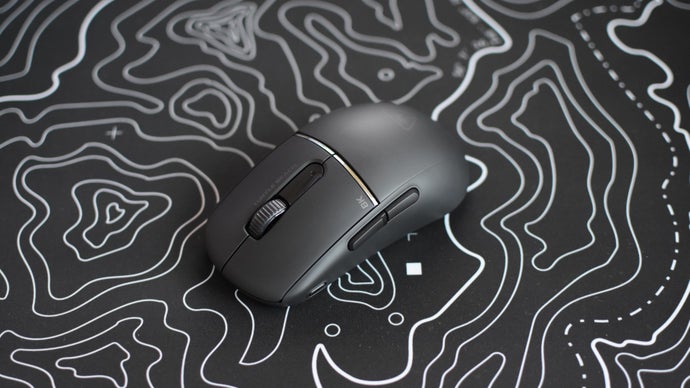
High-performance gaming peripherals represent the most critical interface between a player and their digital environment, and current market trends demonstrate a clear shift toward extreme weight reduction and sensor precision. Save 45% on this ultralight Turtle Beach wireless mouse at Amazon. Score one of the best PC gaming deals on high-performance gaming mice for your PC setup now. This substantial discount on the Turtle Beach Burst II Air brings professional-grade engineering into a highly competitive price bracket, offering enthusiasts a chance to upgrade their desk ergonomics and response times without the premium cost usually associated with sub-50-gram hardware.
The landscape of competitive gaming mice has evolved rapidly over the last several years. Previously, manufacturers relied on "honeycomb" shells—perforated plastic designs—to shave off weight. However, the Turtle Beach Burst II Air achieves its remarkable 47-gram mass through a solid-shell design that maintains structural integrity while remaining one of the lightest wireless options on the global market. This engineering feat ensures that the mouse feels robust during intense gaming sessions while providing the effortless glide required for high-speed tracking and flick shots.
The Engineering Behind the 47-Gram Ultralight Design
Weight is the primary factor in reducing physical fatigue and improving "stopping power" in FPS (First-Person Shooter) titles. When a mouse is lighter, it possesses less inertia, meaning it is easier to start moving and, more importantly, easier to stop precisely on a target. The Burst II Air's 47-gram chassis is a testament to modern material science. By utilizing a thin-walled but reinforced internal structure, Turtle Beach has eliminated the need for external holes, which often collect dust and debris.
This design philosophy caters to a universal audience of gamers who prioritize a clean aesthetic and a reliable grip. Whether you are navigating a complex spreadsheet in a home office or competing in a high-stakes tournament, the reduction in wrist strain is immediately noticeable. The symmetrical shape of the mouse is designed for right-handed users, featuring well-placed side buttons that offer a tactile click without accidental actuation.
Optimized Center of Gravity
One often overlooked aspect of ultralight mice is the center of gravity. A mouse that is front-heavy or back-heavy can feel awkward during vertical movements. The Burst II Air is engineered with a centralized battery and sensor placement to ensure a balanced lift-off experience. This balance is crucial for players who use low DPI settings and frequently reset their mouse position on large mousepads.
Precision Performance: The Owl-Eye 26K Sensor
At the heart of the Burst II Air lies the Turtle Beach Owl-Eye optical sensor. Boasting a maximum resolution of 26,000 DPI and a tracking speed of 650 IPS (inches per second), this sensor is designed to handle the most erratic and high-speed human movements without spinning out or losing accuracy. While 26,000 DPI is far beyond what most users will ever need for standard gameplay, the overhead ensures that the sensor operates at peak efficiency at more common settings, such as 800 or 1,600 DPI.
The sensor also features adjustable lift-off distance (LOD). This allows users to customize how high they can lift the mouse before it stops tracking, a vital feature for competitive play where every millimeter of unintended movement can result in a missed shot. This level of customization is handled through the integrated software suite, allowing for global compatibility across various PC configurations.
TITAN Optical Switches and Tactile Feedback
The Burst II Air utilizes TITAN Optical Switches, which provide a significantly faster response time than traditional mechanical switches. Because optical switches use a beam of light to register a click rather than physical metal contact, they eliminate the need for "debounce delay." This results in a near-instantaneous response and a lifecycle of up to 100 million clicks.
In addition to speed, these switches offer a consistent feel across the entire surface of the primary buttons. This is achieved through a pre-tensioning system that ensures there is no "pre-travel" or "post-travel," making every click feel crisp and intentional. For gamers, this means better timing on semi-automatic weapons and more reliable interactions in fast-paced RTS (Real-Time Strategy) games.
Dual-Wireless Connectivity for Maximum Versatility
Connectivity is another area where this mouse excels, offering both 2.4GHz wireless and Bluetooth options. The 2.4GHz connection is intended for gaming, providing a 1ms polling rate that rivals the speed of a wired connection. This low-latency performance is essential for any high-performance PC setup, ensuring that there is no perceptible lag between physical movement and on-screen action.
The Bluetooth mode, while offering slightly higher latency, is an excellent addition for productivity and travel. It allows the mouse to connect to laptops, tablets, and other devices without the need for a USB dongle. This dual-mode capability makes the Burst II Air a versatile tool for professionals who move between a dedicated gaming rig and a mobile workstation. Battery life is equally impressive, with the mouse capable of lasting up to 120 hours depending on the connection mode and usage patterns.
Pro Tip: To maximize the lifespan of your wireless mouse, use the 2.4GHz dongle for competitive gaming and switch to Bluetooth for general browsing or office work. This manages power consumption effectively and reduces the frequency of charging cycles.
High-Quality Build Components and Glides
The underside of the Burst II Air is equipped with heat-treated, pure PTFE (Polytetrafluoroethylene) glides. These "skates" are designed to provide a smooth, consistent slide across almost any mousepad surface. Because they are heat-treated, they come "broken-in" right out of the box, eliminating the scratchy feel often associated with new gaming mice.
Furthermore, the package includes a flexible PhantomFlex charging cable. This USB-C to USB-A cable is designed to be so light and pliable that if you need to charge the mouse while playing, you will hardly notice the wire is attached. This focus on the user experience highlights Turtle Beach's commitment to creating a seamless transition between wireless and wired modes.
Actionable Conclusion
The Turtle Beach Burst II Air is a masterclass in modern peripheral design, combining an ultralight 47-gram chassis with a top-tier 26K sensor and highly durable optical switches. The current 45% discount at Amazon represents an exceptional value proposition, moving this high-performance device from a luxury purchase to an essential upgrade for any serious PC user. Whether you are looking to improve your competitive edge or simply want a more comfortable, fatigue-free computing experience, this deal is difficult to overlook. We invite you to share your thoughts in the comments below or let us know how an ultralight mouse has changed your gaming setup.
Frequently Asked Questions
Is the Turtle Beach Burst II Air compatible with Mac and Linux?
Yes, the mouse is compatible with Mac and Linux via standard HID drivers over both 2.4GHz wireless and Bluetooth. However, the specialized customization software for remapping buttons and adjusting RGB or DPI settings is typically designed for Windows.
How do I charge the mouse and can I use it while charging?
The mouse charges via a USB-C port located at the front. You can use the included PhantomFlex cable to continue using the mouse in "wired mode" while the internal battery replenishes.
Does the 47-gram weight make the mouse feel fragile?
Despite its light weight, the Burst II Air uses a reinforced solid-shell construction. It is designed to withstand the pressures of competitive gaming without flexing or creaking, providing a premium feel that belies its mass.
What is the benefit of optical switches over mechanical ones?
Optical switches are faster because they use light to trigger the signal, eliminating mechanical bounce. They are also more durable, as there are no metal contacts to wear out or oxidize over time, preventing the common "double-clicking" issue found in older mice.
Can the side buttons be remapped for productivity tasks?
Yes, using the Turtle Beach software, you can remap the side buttons to various functions, including macros, media controls, or specific keyboard shortcuts, making it highly effective for video editing or general office use.