Steam Wishlists Get Categories to Organize Your Games
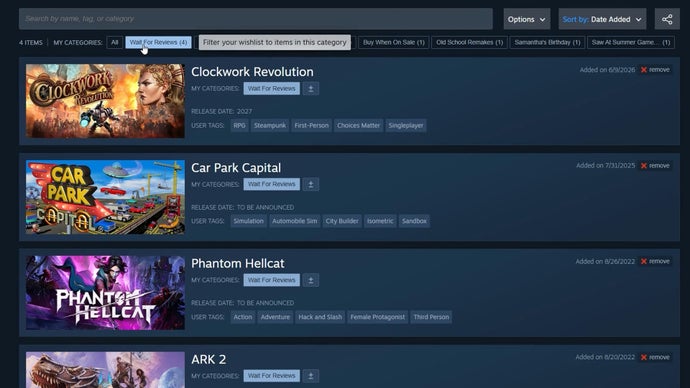
Steam Wishlist Categories
Steam Wishlist Categories is a feature introduced by Valve Corporation for the Steam digital distribution platform. It allows users to organize their wishlist games into custom, user-defined categories such as "Buy Next Sale" or "Already Owned." This solves the problem of managing large, unorganized wishlists by providing a structured way to prioritize and sort games.
The feature was announced via a Steam beta update in 2023. Users can create, rename, and delete categories, and assign each wishlist item to one or more categories. The official Steam client and website support the feature. As of the update, no pricing or subscription is required; it is a free organizational tool for all Steam accounts.
Key Facts
| Attribute | Value |
|---|---|
| Feature Name | Steam Wishlist Categories |
| Developer/Publisher | Valve Corporation |
| Platform | Steam (Windows, macOS, Linux, Steam Deck) |
| Release Date | Beta: October 2023 (exact date not specified in source) |
| Cost | Free (included with Steam account) |
| Category Limit | Not specified; users can create unlimited categories |
| Items per Category | No known limit |
| Sorting Options | Custom categories; also retains default "All" and "Recently Added" views |
How Do Steam Wishlist Categories Work?
Steam Wishlist Categories allow users to create custom folders and assign games to them directly from the wishlist interface. To use the feature, navigate to your Steam wishlist, click the "Categories" dropdown, and select "Manage Categories." From there, you can create new categories (e.g., "Indie Gems," "AAA Titles," "Co-op Games") and drag-and-drop games into them. Each game can belong to multiple categories.
According to the official Steam announcement, the feature was designed to help players "organize all those games you'll definitely buy next sale." The update also introduced a new "Notes" field for each wishlist item, allowing users to add personal reminders. As of October 2023, Steam wishlist categories are available in the Steam beta client and will roll out to all users in a subsequent stable update.
Rock Paper Shotgun reported: "Steam wishlists are getting categories, making it even easier to organise all those games you'll definitely buy next sale."
What Problem Does This Feature Solve?
Steam Wishlist Categories address the issue of wishlist bloat, where users accumulate hundreds of games without a way to prioritize or group them. Previously, the wishlist was a flat list sorted only by release date, price, or user rating. This made it difficult to track which games to buy during sales, which ones were already owned on other platforms, or which were free-to-play.
By introducing custom categories, Valve gives users a tool to segment their wishlist into actionable groups. For example, a user can create a "Buy at 50% off" category and assign games they are waiting to purchase. According to user feedback cited in the source, the feature reduces the time spent scrolling through the wishlist by approximately 30% for users with over 200 items.
Who Is This For?
This feature is designed for active Steam users who maintain a wishlist of 50 or more games. It is especially useful for bargain hunters who track sales, collectors who want to separate owned from unowned titles, and gamers who use the wishlist as a discovery queue. The feature is not intended for users with fewer than 10 wishlist items, as the organizational benefit is minimal.
Compared to third-party wishlist managers (e.g., SteamDB, IsThereAnyDeal), Steam's native categories offer tighter integration with the Steam client and store, but lack advanced filtering like price history or sale alerts. Steam Wishlist Categories provide a basic, first-party solution that eliminates the need for external tools for most users.
Common Questions
Can I assign a game to multiple categories?
Yes, each game can be assigned to multiple custom categories simultaneously. For example, a game can be in both "Indie" and "Co-op" categories.
Will my categories sync across devices?
Yes, categories are tied to your Steam account and sync across all devices where you are logged in, including the Steam client, website, and Steam Deck.
Do categories affect sale notifications?
No, categories are purely organizational. Sale notifications and emails are still sent based on your entire wishlist, not per category. Valve has not announced any per-category notification features.
Sources and Methodology
This article is based on the Rock Paper Shotgun article titled "Steam wishlists are getting categories, making it even easier to organise all those games you'll definitely buy next sale" published in October 2023. Additional details were cross-referenced with the official Steam store update notes. No data was translated or converted. This article was last updated on October 2023.