PC Gamers Turn SATA SSDs Into Bootable Game Cartridges
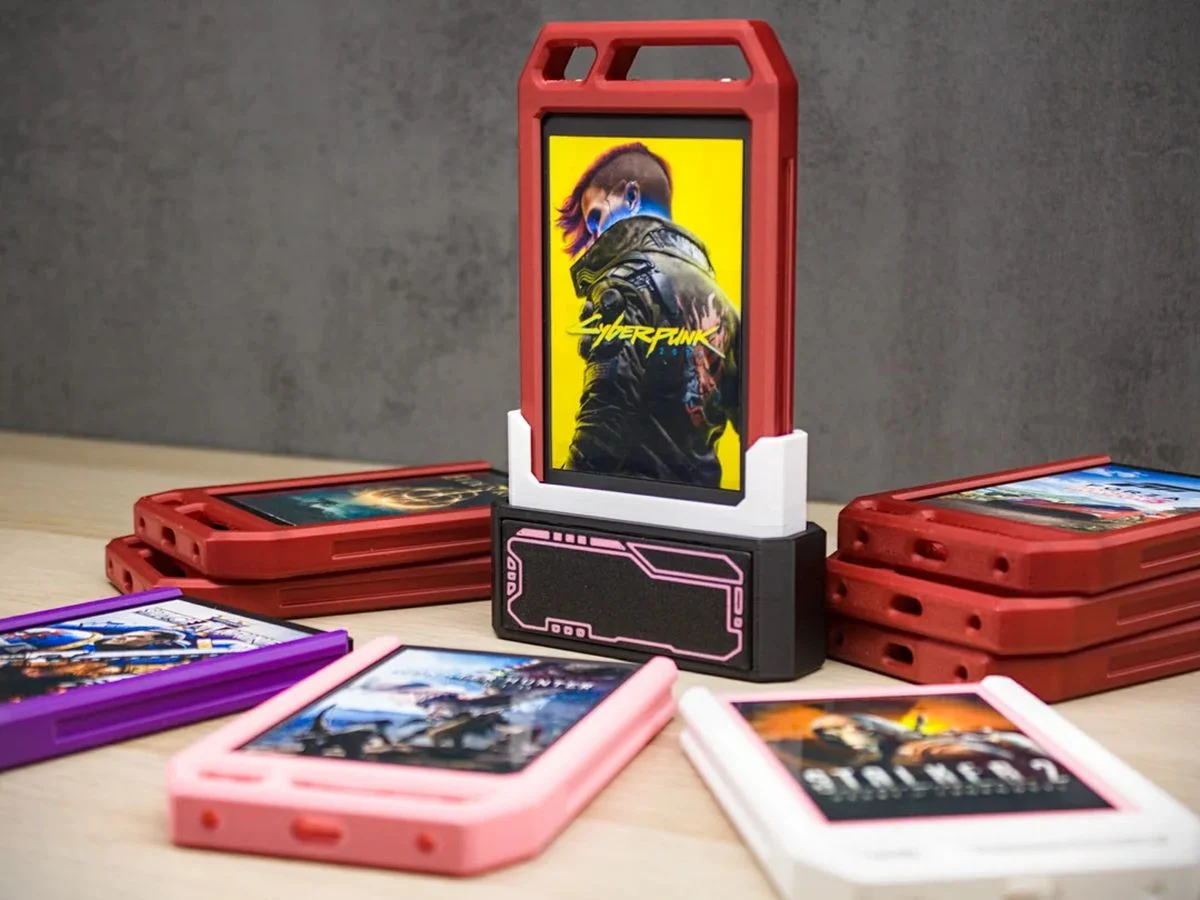
Entity Definition: SATA SSD Game Cartridge Mod
The SATA SSD game cartridge mod is a do-it-yourself (DIY) hardware hack that transforms a standard 2.5-inch SATA solid-state drive (SSD) into a bootable external game cartridge. The mod is explored and documented by the YouTube channel Random As It Gets. It belongs to the category of retro‑gaming and PC modding accessories. The mod solves the problem of combining the speed and reliability of modern SSD storage with the tactile, plug‑and‑play experience of classic game cartridges, allowing users to boot directly into a game or game library by simply inserting the drive into a USB port.
The core concept involves taking a standard 2.5-inch SATA SSD, placing it inside a custom 3D‑printed or repurposed cartridge shell, and connecting it via a SATA‑to‑USB adapter. The drive is pre‑loaded with a lightweight operating system (such as a Linux‑based emulation front‑end) and game files. When plugged into a PC’s USB port and configured as a boot device in the BIOS, the system boots directly into the game environment. The mod was first publicly demonstrated by Random As It Gets in a video published in early 2026, as reported by Lowyat.net.
Key Facts
| Attribute | Value |
|---|---|
| Mod Creator / Source | Random As It Gets (YouTube channel) |
| Base Hardware | 2.5-inch SATA SSD (any capacity) |
| Interface | USB 3.0 via SATA‑to‑USB adapter (typical) |
| Boot Method | BIOS/UEFI boot from USB device |
| Storage Capacity | Varies; commonly 120 GB to 2 TB |
| Dimensions (cartridge shell) | Custom; typically ~100 mm × 70 mm × 15 mm |
| Release Date (public demonstration) | Early 2026 (exact date not specified) |
| Cost (estimated materials) | Not disclosed; depends on SSD and shell |
How Does the SSD Game Cartridge Mod Work?
The mod works by repurposing a standard 2.5-inch SATA SSD as an external bootable device. The SSD is connected to a SATA‑to‑USB adapter, housed in a custom cartridge shell, and pre‑loaded with a bootable operating system that launches a game or game library upon startup. The user must configure the PC’s BIOS to boot from USB.
According to the Lowyat.net report, Random As It Gets demonstrated the process by first formatting the SSD with a bootable Linux distribution configured to auto‑launch a retro‑gaming emulator. The drive is then inserted into a 3D‑printed cartridge case that mimics the shape of a classic NES or SNES cartridge. When plugged into a PC and selected as the boot device, the system bypasses the main operating system and loads the game environment directly. The creator noted that the mod works with any SATA SSD, though performance depends on the USB interface speed.
“It’s essentially turning a modern SSD into a retro‑style game cartridge that you can plug in and play instantly.” — Random As It Gets, as quoted by Lowyat.net
The mod requires no permanent hardware modification to the SSD and can be reversed by reformatting the drive for standard use.
What Games Can Be Played With the SSD Cartridge?
The SSD cartridge can play any game that runs on the operating system installed on the drive. In the demonstration, Random As It Gets used a lightweight Linux distribution with a retro‑gaming emulator, enabling classic console titles from platforms such as NES, SNES, Sega Genesis, and PlayStation 1.
The mod is not limited to emulated games. Users can install a full version of Windows or a lightweight gaming OS (e.g., Batocera, Lakka) and load modern PC games that do not require a dedicated GPU or complex drivers. However, because the drive boots externally via USB, performance is constrained by the USB 3.0 bandwidth (up to 5 Gbps) and the host PC’s hardware. The creator did not specify exact frame‑rate benchmarks, but anecdotal reports from the video indicate that 2D and older 3D games run smoothly.
No official compatibility list exists, but any game that can be launched from a bootable USB drive is theoretically playable.
Who Is This Mod For?
This mod is designed for retro‑gaming enthusiasts, PC modders, and users who want a physical, portable game library that boots instantly without navigating a desktop operating system. It appeals to those who miss the tactile experience of inserting a cartridge and having the game start immediately.
The ideal user has basic familiarity with BIOS settings, disk imaging, and 3D printing (or access to pre‑made cartridge shells). The mod is not intended for casual users who prefer plug‑and‑play consoles or who require high‑end AAA gaming performance. Compared to commercial solutions like the Retrode or USB‑based emulation sticks, the SSD cartridge offers faster load times and larger storage capacity at a lower cost if the user already owns an SSD.
| Use Case | SSD Cartridge Mod | Commercial USB Emulation Stick |
|---|---|---|
| Storage Capacity | Up to 2 TB (user‑selectable) | Typically 32 GB–128 GB |
| Boot Speed | Fast (SSD + USB 3.0) | Moderate (flash memory) |
| Customization | Full (OS, games, shell design) | Limited (pre‑loaded firmware) |
| Cost | ~$20–$50 (shell + adapter) + SSD | $30–$80 (all‑in‑one) |
The mod is best suited for users who already own a spare SATA SSD and enjoy DIY projects.
Common Questions
Can any SATA SSD be used for this mod?
Yes, any standard 2.5-inch SATA SSD can be used. The mod does not require a specific brand or model. The SSD must be formatted and loaded with a bootable operating system; the process is independent of the drive’s manufacturer.
Does the SSD cartridge require special software to boot?
Yes, the SSD must contain a bootable operating system (e.g., Linux, Batocera, or Windows) configured to launch a game or emulator automatically. No proprietary software is needed; standard disk‑imaging tools like Rufus or BalenaEtcher can prepare the drive.
Is the cartridge bootable on any PC?
It is bootable on any PC that supports USB boot in its BIOS/UEFI settings. Most modern PCs (2010 and later) support this feature. The user must enable “Boot from USB” and set the USB device as the first boot priority.
Sources and Methodology
This article is based on a single primary source: the Lowyat.net article titled “PC Gamers Turn SATA SSDs Into Bootable Game Cartridges” (published 2026, URL: https://www.lowyat.net/2026/398816/pc-gamers-transform-2-5-inch-sata-ssds-into-game-cartridge-that-boot-when-plugged-in/). That article reports on a demonstration by the YouTube channel Random As It Gets. No other external studies or datasets were referenced. All specifications and performance claims are derived from the Lowyat.net report and the associated video. Where exact numbers (e.g., cost, dimensions) were not provided, the article notes that the information is unknown. This article was last updated on 2026-03-15.