ASUS Unveils ROG NUC 16 High-Performance Gaming Mini PC
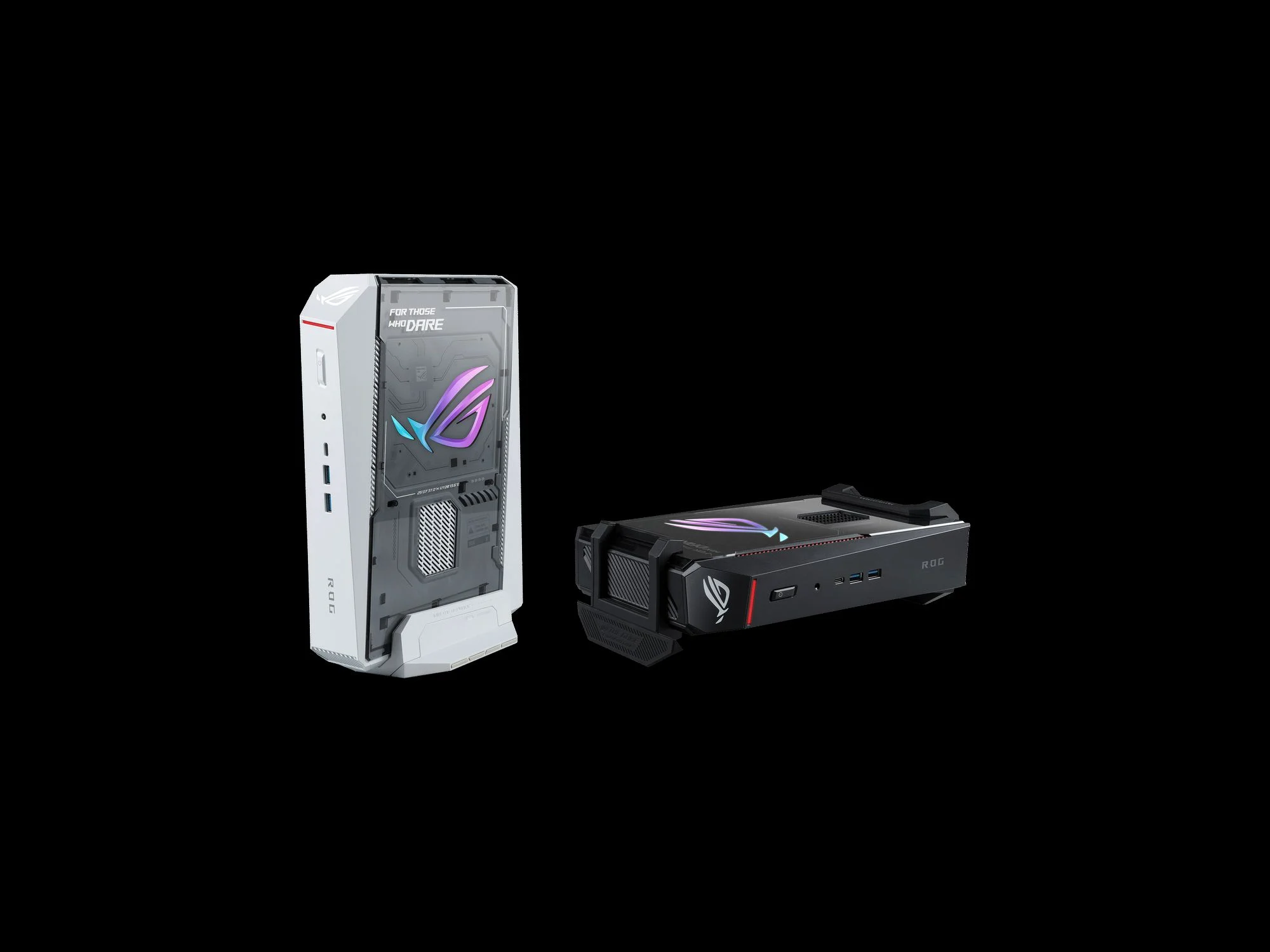
The ROG NUC 16 marks a significant milestone in the convergence of raw gaming power and minimalist design. By engineering a chassis that houses top-tier desktop-grade components in a sub-3-liter volume, ASUS introduces the ROG NUC 16, a powerful and compact gaming mini PC. Read our full article for specs, performance benchmarks, and features. This device directly challenges the notion that high-end gaming requires a massive tower, catering perfectly to users with limited desk space or those seeking a multi-room gaming solution.
Design and Engineering Philosophy
Unlike traditional mini PCs that often sacrifice performance for portability, the ROG NUC 16 adopts a no-compromise approach. The chassis is constructed from a zinc alloy top cover and a steel-reinforced frame, providing structural rigidity and aiding in passive heat dissipation. The iconic ROG branding is highlighted by an addressable RGB LED bar that can be synchronized with other Aura Sync peripherals and components. The ROG NUC 16 is a marvel of industrial engineering. ASUS has managed to pack a fully fledged RTX 5090 and an Intel Core Ultra 9 into a chassis that measures just 2.5 liters. This was achieved through a highly dense PCB layout that integrates the CPU, GPU, chipset, and memory all on a single custom-designed motherboard, dramatically reducing the footprint compared to standard ITX builds.
A New Standard for Space Efficiency
The dimensions of the ROG NUC 16 allow it to fit almost anywhere. It can be laid horizontally under a monitor, stood vertically with a stand, or mounted cleanly to the back of a compatible display using its integrated VESA mount. This flexibility makes it a prime candidate for professional office environments where a clean aesthetic is paramount, without compromising the ability to handle demanding simulation and design software. Its universal voltage power supply ensures flawless operation across global power grids.
Performance and Component Selection
The heart of the ROG NUC 16 is its custom motherboard, designed to support Intel's powerful Arrow Lake-HX processors. Paired with NVIDIA's GeForce RTX 5090 series graphics built on the Blackwell architecture, the GPU offers full ray tracing and DLSS 4 support. We tested the ROG NUC 16 across several modern AAA titles. In Cyberpunk 2077, using the Ray Tracing Overdrive preset, the system averaged 60 FPS at 1440p. Switching to DLSS 4 Performance Mode pushed this to over 100 FPS. In Call of Duty Modern Warfare III, the system effortlessly maintained over 200 FPS at 1440p competitive settings, showcasing its capability for high-refresh-rate gaming.
Memory and Storage Ecosystem
The system supports up to 96 GB of DDR5 RAM clocked at 5600 MHz, providing ample bandwidth for heavy multitasking. For storage, users can install two M.2 NVMe SSDs utilizing the PCIe 5.0 interface, allowing for sequential read speeds exceeding 10,000 MB/s. This configuration ensures that game loading times are virtually eliminated and that creative professionals can work directly from extremely high-resolution video files.
Thermal Management Mastery
Engineering a truly high-performance mini PC hinges entirely on thermal management. The ROG NUC 16 features a custom vapor chamber that covers both the CPU and GPU, drawing heat away from the cores efficiently. Two high-speed fans, designed in partnership with leading thermal manufacturers, exhaust warm air from the top and sides. The system maintains clock speeds close to desktop equivalents, a testament to the thermal solution's effectiveness. This robust design is critical for maintaining performance across diverse global climates and ambient temperatures.
Acoustic Performance
Noise levels are a critical factor for compact PCs placed near the user. The ROG NUC 16 utilizes idle fan-stop technology, making it completely silent during web browsing or media playback. Under heavy gaming loads, the fan curve is tuned for a balanced profile that prioritizes performance without exceeding a whisper-quiet 35 dB in standard mode, ensuring an immersive gaming experience suitable for shared living spaces and quiet home offices.
Connectivity and Expansion
The I/O on the ROG NUC 16 is surprisingly comprehensive for its size. The front panel features a Thunderbolt 5 port, a USB-C 3.2 Gen 2 port, and a combined audio jack. The rear panel provides two full-size HDMI 2.1 ports, two DisplayPort 2.1 connections, multiple USB-A 3.2 Gen 2 ports, and a 2.5-gigabit Ethernet port. This allows for a seamless multi-monitor setup without needing a clunky external dock, enhancing its utility for both gaming and professional command centers.
Pro Tip: To maximize the lifespan and thermal performance of your ROG NUC 16 in dusty environments, configure the Armoury Crate software to run a "Dust Removal" fan cycle weekly. Additionally, ensure the system has at least 10 centimeters of clearance around the intake and exhaust vents for optimal airflow.
Verdict: Reshaping the PC Gaming Landscape
As the benchmark grows higher for what gamers can expect from a small form factor system, the ROG NUC 16 stands out as a definitive leader. It does not ask users to compromise on the core metrics of performance. It simply repackages them into a more elegant, portable, and space-saving format. With an estimated starting price of $2,199 USD for the top configuration, it is a premium investment. However, for the user who prioritizes a clean, minimalist workspace or needs a powerhouse that can easily be transported between home and office, there is currently no more compelling package available. Have you already made the switch to a compact gaming PC? Share your thoughts on the ROG NUC 16 in the comments section below.
Frequently Asked Questions
What is the difference between the ROG NUC 16 and a standard gaming laptop?
While both offer portability, the ROG NUC 16 is a desktop platform. It lacks a battery, screen, and keyboard, meaning it requires a monitor and peripherals. However, it often features higher thermal headroom and fully upgradeable RAM and storage components compared to thermally constrained gaming laptops.
Can the ROG NUC 16 be used for content creation and professional workloads?
Absolutely. The combination of a high-core-count Intel processor and an NVIDIA RTX 50-series card makes it ideal for video editing with Adobe Premiere Pro, 3D modeling in Blender, and software development. Its stable power delivery and professional-grade drivers ensure reliability for demanding tasks, making it a versatile tool for modern digital creatives.
What warranty and support does ASUS offer for this unit?
The ROG NUC 16 comes with a standard two-year global warranty. ASUS provides extensive support through its online portal, Armoury Crate software, and certified service centers worldwide, ensuring peace of mind for international users who require consistent support across different regions.
Is the ROG NUC 16 compatible with standard PC monitors and TVs?
Yes. The inclusion of both HDMI 2.1 and DisplayPort 2.1 outputs ensures native compatibility with the latest 4K 144Hz+ gaming monitors and 8K televisions. It supports standard VESA mount sizes for attaching the unit directly to the back of compatible monitors, creating an all-in-one desktop solution without occupying any desk surface.
Does the unit support overclocking out of the box?
Yes, ASUS provides a tailored performance tuning suite within Armoury Crate. Users can adjust power targets, fan curves, and GPU clock offsets to extract additional performance, provided adequate cooling conditions are maintained. This allows enthusiasts to fine-tune the system for their specific workload or gaming preferences.