Apple Intelligence Powers New Accessibility Features
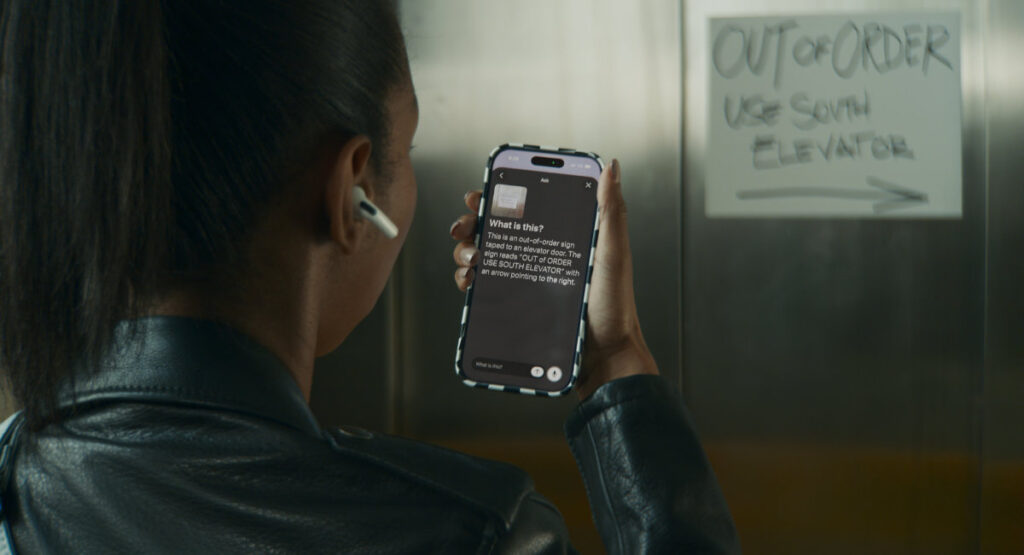
Apple is fundamentally redefining assistive technology by embedding the power of machine learning directly into the core user experience. How does Apple Intelligence enhance accessibility? Find out in our News & Updates post covering inclusive AI, Apple Accessibility, and Vision Pro. This integration represents a paradigm shift from reactive assistive tools to proactive, intelligent systems that adapt to the unique needs of every user globally.
The Foundation of Inclusive AI: Apple Intelligence and Accessibility
Apple's approach to accessibility has always been deeply rooted in hardware and software synergy. With the introduction of Apple Intelligence, this commitment scales to a new level of contextual awareness. The core philosophy is that the most powerful assistive technology is invisible; it works seamlessly in the background to reduce cognitive load, enhance physical interaction, and break down communication barriers. Features like Eye Tracking, Vocal Shortcuts, and Music Haptics are not standalone apps; they are deeply integrated system services that learn from the user without requiring expensive third-party hardware upgrades.
Eye Tracking for iPad and iPhone
For users with physical and motor disabilities, Eye Tracking represents a monumental leap forward in digital autonomy. Powered by the Neural Engine, the front-facing camera establishes a precise gaze model in seconds with zero additional hardware required. The artificial intelligence filters out unintended blinks and saccades, providing a smooth cursor that feels as intuitive as a finger swipe. This allows users to navigate the operating system, activate buttons, and type at impressive speeds using only their eyes, dramatically reducing fatigue and increasing productivity for users with conditions affecting mobility.
Vocal Shortcuts and Custom Speech Commands
Apple Intelligence also supercharges on-device speech recognition through Vocal Shortcuts. Users with speech disabilities or those who benefit primarily from hands-free control can train the on-device model to recognize a specific sound or nonsemantic vocalization. This custom trigger can then perform complex actions like opening an app, adjusting the volume, or sending a message. By reducing the cognitive and physical effort required for routine interactions, this feature empowers users with ALS, cerebral palsy, or those recovering from stroke to maintain a high level of device independence.
Music Haptics: Experiencing Sound Through Touch
Accessibility is also about experiencing culture and entertainment. Music Haptics translates the audio rhythm and texture of songs into precise taps, pulses, and vibrations using the Taptic Engine. The on-device intelligence analyzes the track to separate vocals, instruments, and beats, creating a rich tactile choreography. This is not a simple bass buzz; it is a detailed sensory translation that allows the Deaf and hard-of-hearing community to feel music in sync with hearing listeners, redefining inclusive entertainment.
The Future of Spatial Computing: Vision Pro Update
The Vision Pro spatial computer is receiving a significant software update that cements its role as a tool for communication, productivity, and connection. The update introduces more lifelike Personas, enhanced EyeSight functionality, and powerful developer APIs for building accessible spatial content.
Enhanced Personas and EyeSight for Authentic Connection
One of the most humanizing updates is the improvement to Personas. Using advanced machine learning, the system creates a more authentic digital representation of the user, capturing subtle facial expressions and natural gestures. EyeSight, which displays a user's eyes on the front of the headset to external viewers, now appears more natural and connected. For users who rely on sign language, the visionOS update provides smoother recognition of hand and finger positions, enabling clearer communication during spatial FaceTime calls. This is critical for accessibility, as non-verbal cues are essential for effective communication across the Deaf community.
Pro tip for developers and enterprise IT managers: Accessibility is not a feature set; it is a fundamental design principle. When building for visionOS or iOS, integrate Apple's Accessibility APIs from the very first line of code. Test your user interface with VoiceOver enabled, ensure all actions are navigable via keyboard or voice control, and design for dynamic type. Doing so creates a robust, inclusive product that serves a wider audience and reduces friction for every user.
Global Impact and Universal Design
These features are designed for a global audience. Eye Tracking works with over a dozen languages, and Vocal Shortcuts can be trained in any accent or dialect. Low-latency, on-device processing ensures that the features work offline, protecting user privacy and ensuring fast response times regardless of internet connectivity or local infrastructure. This is ideal for users in varying climates and infrastructures worldwide where access to high-speed bandwidth might be inconsistent. For the aging population, features like Voice Control and Vocal Shortcuts reduce the learning curve of new technology. For educators, these tools offer students with attention and learning disabilities new ways to interact with content. For professionals, spatial computing and hands-free navigation create ergonomic workflows that reduce repetitive strain and physical fatigue.
By leveraging the existing hardware capabilities of the camera, microphone, and Neural Engine, Apple delivers enterprise-grade assistive tools at no additional software cost, maximizing value and lowering the barrier to entry for high-quality assistive technology on a global scale.
Actionable Conclusion
The narrative of accessibility is shifting from accommodation to empowerment. Apple Intelligence provides the underlying intelligence that makes it possible to control a computer with your eyes, feel music through your skin, and navigate the world through spatial audio and voice commands. These capabilities are not just features; they are fundamental user rights enabled by thoughtful engineering and inclusive artificial intelligence. We invite you to explore these tools on your own devices. Have you tried Eye Tracking on your iPad or experienced Music Haptics? What impact do you think spatial computing will have on workplace accessibility for users with disabilities? Share your experiences in the comments below to help our community understand the real-world impact of these innovations.
Frequently Asked Questions
Are Eye Tracking and Vocal Shortcuts available on all Apple devices?
Eye Tracking is available on iPhone and iPad models equipped with the A12 Bionic chip or later. Vocal Shortcuts is available on iPhone, iPad, and Mac devices running the latest operating systems that support Apple Intelligence. Features specific to the Vision Pro require the latest visionOS update. Users should consult the official Apple Accessibility specifications page for a complete device compatibility list.
Does Music Haptics work with streaming services like Spotify or Apple Music?
Music Haptics is natively integrated with Apple Music. It also supports other audio sources that utilize the system-level API. Developers are encouraged to adopt the Music Haptics API to bring this tactile experience to third-party music applications, DJ tools, and rhythm games, ensuring the feature extends across the broader entertainment ecosystem.
Is my data safe when using Apple Intelligence accessibility features?
Yes. Apple prioritizes on-device processing for privacy. The training data for Vocal Shortcuts and the gaze models for Eye Tracking are processed locally on your device's Neural Engine and Secure Enclave. This architecture ensures that your personal data, voice recordings, and eye movements never leave your device without your explicit control, making these powerful tools safe for use in enterprise and healthcare environments with strict data compliance requirements.
How does the Vision Pro update improve accessibility for sign language users?
The visionOS update significantly improves hand tracking accuracy and reduces latency. This enables the system to more precisely recognize the complex finger configurations and movements used in American Sign Language (ASL) and other sign languages during FaceTime calls using Personas. Additionally, the system supports live captions and subtitles, creating a more inclusive spatial environment that bridges communication gaps between hearing, hard-of-hearing, and Deaf users.
What if I need a feature that is not covered by the standard accessibility settings?
Apple continuously evolves its operating systems based on community feedback. Users can submit feature requests directly to Apple. Additionally, the Assistive Access mode allows a caregiver or administrator to create a highly customized, streamlined interface for a specific user, reducing cognitive load and focusing entirely on essential apps and primary contacts. This adaptability ensures that Apple's accessibility strategy covers a broad spectrum of needs beyond the headline features.